
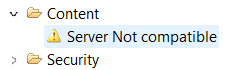
HANA Studio/Eclipse error: Server not compatible
While trying to access content in HANA Studio or Eclipse development perspective, the error ‘Server not compatible’ is being displayed.
Solution
- Ensure the HANA Studio version is compatible with HANA Server revision. (see referenced SAP Note 2375176)
- Ensure all developers use the minimum allowed HANA Studio revision according to (see referenced SAP Note 2375176)
- Add parameter -ignoreCompatibilityCheck to hdbstudio.ini before ‘-vm’ and restart HANA Studio
- Example:
–launcher.appendVmargs
-ignoreCompatibilityCheck
-vm
- Example: